WiFi,,Facebook,Twitter,Google,Hotmail, Etc... Complete Dictionary list for attack and use Wi-Fi hacking Highly compress Free download


Just Click on SKIP AD to Start Download

Windows XP Highly Compressed
 Windows XP is an operating system introduced in 2001 from Microsoft'sWindows family of operating systems, the previous version of Windows being Windows Me. The "XP" in Windows XP stands for eXPexperience

Windows XP is an operating system introduced in 2001 from Microsoft'sWindows family of operating systems, the previous version of Windows being Windows Me. The "XP" in Windows XP stands for eXPexperienceMS Office 2007 free download Silent WS
 Microsoft Office is the most popular and widely spread productivity suite, both in home and professional environments. Microsoft Office is the most popular and widely spread productivity suite, both in home and professional environments. |
| MS Office 2007 free download Silent (WS) |
Internet Download Manager (No Fake Serial)
 Internet Download Manager is the choice of many, when it comes to increasing download speeds up to 5x. IDM has a clever download logic accelerator that features intelligent dynamic file segmentation and incorporates safe multipart downloading technology to increase the speed of your downloads. IDM reuses available connections without additional connections to gain the best acceleration performance.
How To Use UltraISO Software To Create Bootable USB Flash Drive
Want to create a bootable Windows USB flash drive to install Windows without using DVD? Do you still use the good old UltraISO software to burn ISO files to CD or DVD? Then you use the UltraISO software to create bootable USB flash drive with a few clicks.
Here is how to use UltraISO software to create bootable USB drive:
Step 1: Install Ultra ISO by clicking on the link given below.
Step 2: The next step is to run UltraISO trial version with admin rights. Right-click on the UltraISO software shortcut on the desktop or Start menu entry, and select Run as administrator option. If you are prompted with Register Now screen, click Continue to Try.. button to use the trial version.


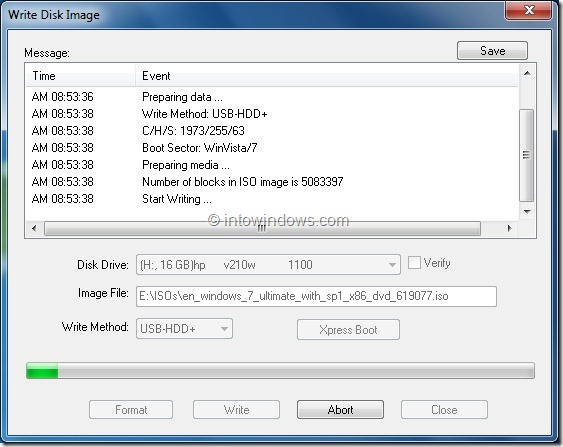
Step 4: Next, in the home screen of UltraISO, click on Bootable menu and then click Write Disk Image option to launch Write Disk Image dialog box.
 Step 5: In the Write Disk Image dialog, select the Disk Drive as your USB flash drive, select the write method as USB-HDD before hitting the Format button. It will then launch Format Removable Disk dialog, where you need to simply click Start button to begin formatting the flash drive. Please backup all data from the USB device before hitting the Format button.


 Step 6: Once the format in done, click Write button and then click Yes for the warning prompt to start the process. When the writing is finished, you will see Burn Successful message event list. Close UltraISO software and connect your USB to a machine to start installing Windows.



Any Video Converter Professional (WS)
 Any Video Converter is an All-in-One video converting tool with easy-to-use graphical interface, fast converting speed and excellent video quality. It allows you to effortlessly convert video files between every format! It can convert almost all video formats including DivX, XviD, MOV, rm, rmvb, MPEG, VOB, DVD, WMV, AVI to MPEG-4 movie format for iPod/PSP or other portable video device, MP4 player or smart phone. It also supports any user defined video file formats as the output. Any Video Converter makes it easy for anyone to enjoy the any format video with your iPod, PSP, mobile phone or MP4 player.

CCleaner Professional (WS)
From its name, you can guess that CCleaner is used to clean up your system. In fact, the first 'C' in CCleaner stands for the 'crap' that it can clean out. It has other uses too:
- Privacy: Delete passwords, Internet files, configuration files, and remove System Restore points from a shared PC.
- Speed: Speed up your computer by removing unneeded files. Speed up boot times by reducing the number of programs that start with Windows.
- Stability: Enable Windows to run more smoothly with a clean Registry.
- Space: Free up hard drive space by deleting unnecessary files. Detect and remove duplicate files that clutter up your PC.
Angry Birds All Games (WS)


Angry Birds Part 01
Angry Birds Part 02
Angry Birds Part 03

Avast Internet Security 2015 (WS)
Maximum virus and anti-spyware security solution for your Windows desktop. Provides also antispam and firewall protection from latest internet threats.

Internet Download Manager (Registered)

Download Here

UNBLOCK YOUTUBE
Ab apko kissi bhi software ya proxy use kernay ki zarorat nai kyu kay ab youtube unblock karain sirf eak extentions ki madad say woo bhi sirf 15 second main... too dair kis bt ki abhi video dakhain aur youtube ko unblock karain
First Time Charges And Then Life Time Free Update Receving
WATCH VIDEO


contect :www.facebook.com/JUSTCHILLTALHA
Also follow me on twitter write in your message
follow H_4Hacking
and send to 40404 and receive my updates on your mobilesPart 1

Part 2
 |
Download 108 Post File
|


You can use the default details template or you tins customize the miniature to better suit the needs of your users. Use the Details Templates Editor to customize the chasing Outlook objects:
Contacts
Users
Groups
Mailbox agents
Public folders
Search discussion crate
Write In Your Message
Follow H_4Hacking
and send to 40404 and receive my updates on your mobile


The BackTrack allotment originated from the integration of two formerly competing allotment which focused on piercing testing:
WHAX: a Slax-based Linux distribution developed by Mati Aharoni, a security consultant. Earlier versions of WHAX were called Whoppix[6] and were based on Knoppix.
Auditor Security Collection: a Live CD based on Knoppix developed by Max Moser which included over 300 supplies organized in a user-friendly hierarchy.
The overlap with Auditor and WHAX in intention and in their collection of tools partly led to the merger.
Tools:
BackTrack provided users with easy access to a comprehensive and large mixture of security-related gear ranging from port scanners to Security Audit. Support for Live CD and Live USB appropriateness allowed exploiter to boot BackTrack directly from portable media without requiring installation, though permanent installation to hard disk and network was also an option.
BackTrack included dozens well known security tools including:
Metasploit for integration
Wi-Fi drivers fostering monitor manner (rfmon mode) and packet injection
Aircrack-ng
Gerix Wifi Cracker
Kismet
Nmap
Ophcrack
Ettercap
Wireshark (formerly known as Ethereal)
BeEF (Browser Exploitation Framework)
Hydra
OWASP Mantra Security Framework, a collection of hacking tools, add-ons and manuscript based on Firefox
Cisco OCS Mass Scanner, a very reliable and fast scanner for Cisco routers with telnet and enabling of a default password.
A large assortment of exploits as well as more commonplace software such as browsers.
BackTrack arranged clothes into 12 categories:
Information gathering
Vulnerability assessment
Exploitation tools
Privilege escalation
Maintaining access
Reverse engineering
RFID tools
Stress testing
Forensics
Reporting tools
Services
Miscellaneous
Write In your message
follow H_4Hacking
and send to 40404 and receive my updates on your mobile
Backtrack 5

Backtrack 5r3 32Bit

Backtrack 5r3 64Bit


If any problem then comments...
Also Follow Me On Twitter And Receive My Updates on your Mobile free
Write in your message
follow H_4Hacking
and send to 40404...
Also Create your refer to increasing your income If any help then contact me on facebook
www.facebook.com/JUSTCHILLTALHA


This article describes technical information about each of the Service Pack 2 (SP2) updates that have been released for the 2007 Microsoft Office client products. This article discusses the following for each update file in SP2:
A link to the Microsoft Knowledge Base article that describes the package. The Knowledge Base article provides more information about the fixes that each service pack package contains.
A link to the Microsoft Download Center Web pages where users can download the packages.
A table that shows detailed information about each of the Microsoft patches (MSPs) that are contained in each update, and the files that are included in each English version of the update files in SP2.
Note These tables only list the versioned files that are included in Service Pack 2. Additional files that do not have versions, such as images or .xml files, are excluded from this list.
This article describes all SP2 updates for the 2007 Office client products. Therefore, this article is lengthy. If you are looking for information about a particular package, please use the table of contents, or search for the update title or KB number.
How to determine whether the service pack is installed
This article helps you determine whether the service pack is installed. To verify the installed version of a 2007 Office product, we recommend that you check the list of installed programs in Windows XP or Windows Vista.
For more information about how to determine which version of a 2007 Office product is installed, click the following article number to view the article in the Microsoft Knowledge Base:
928116 How to determine which version of a 2007 Office product is installed
The first beta of Microsoft Office 2007, referred to as Beta-1 in emails sent to a small number of testers, was released on November 16, 2005. The Beta-1 Technical Refresh was released to testers on March 13, 2006. The Technical Refresh fixed issues in installing with Windows Vista build 5308.
Microsoft revealed the ribbon on March 9, 2006 at CeBIT in Germany.[12]
Office 2007 Beta 2 was announced by Bill Gates at WinHEC 2006, and was initially released to the public at no cost from Microsoft's web site. However, because of an unprecedented number of downloads, a fee of $1.50 was introduced for each product downloaded after August 2, 2006. The beta was updated on September 14, 2006 in Beta 2 Technical Refresh (Beta2TR). It included an updated user interface, better accessibility support, improvements in the robustness of the platform, and greater functionality.
The beta versions continued to function in a reduced functionality mode after February 1, 2007. If users downloaded the Technical Refresh to update Beta 2, then users could use its full functionality until March 31, 2007 for client products and May 15, 2007 for server products. The Beta program ended on November 8, 2006, when Microsoft declared the product "Released to Manufacturing" (RTM) and started manufacturing the final product. After RTM, the availability of the beta download ended.
Office 2007 was released to volume licensing customers on November 30, 2006, and to the general public on January 30, 2007.
Service packs[edit]
Since the release of Microsoft Office 2007, Microsoft has released three service packs, cumulative updates that contain all previous updates released for Microsoft Office 2007 as well as additional features.
Microsoft Office 2007 Service Pack 1 was released on December 11, 2007.[13] Official documentation claims that SP1 is not simply a rollup of publicly released patches, but that it also contains fixes for 455 total issues throughout the entire Office suite.[14] Microsoft Office 2007 Service Pack 2 was released on April 28, 2009.[15] It added improved support for ODF, XPS and PDF standards as well as bug fixes.[16][17] Microsoft Office 2007 Service Pack 3 was released on October 25, 2011.[18] Although Microsoft description article of Service Pack 3 says it contains all previous updates,[19] the package description page in Microsoft Download Center requires Service Pack 1 or 2 to be installed prior to installing Service Pack 3.[18]
Write in your message
follow H_4Hacking
and send to 40404 and receive my updates
How To Install
1:Download part 1 , part 2 , and part 3
2:open part one file and extract it any location all part automatically extract then open setup and install
Click There Name To Download


