Archive for April 2015

This trick is about how to increase ram on android. I hope you liked them all. We will be coming up with more android tricks compilation in future. As you know if your android smartphone’s ram is to short sadly you facing much hanging problems and much more problems, you can not play bigger games or you cannot use bigger size applications, and you can not run multiple application at a time. How to Increase Ram On Android 2015.
Tips to How To Increase Ram On Android 2015 :-)
Requirements for Increase Ram on Android 2015
- SD card (4 or higher SD Card)
- Rooted smartphone Or Rooted Tablet (how to root android)
- SD card reader
- Windows PC
Partition Your SD Card for Increase Ram On Android 2015
- First of all you need to partition your SD Card,
- Download Mini tool Partition.
- Install the application on your PC and connect your SD card to your PC with Card Reader.
- Open Mini Tool Partition in your PC and when the wizards open click on your SD Card and select Delete option. (Note: This will format your SD Card completely mean that it will erase your data permanently, so previous to doing this backup your data at any place in PC or other Storage device.)
- When the Formatting of your SD Card is completed then, you have whole of space of your SD Card as unallocated then Right click SD Card and select make option.
- A popup box will open giving you options for making partition; select the partition as primary and file system as FAT if SD Card is less than 4GB or FAT32 if your SD Card is more than 4GB.
- Leave about 512 MB or more space (your choice) for making the next partition.
- Then select done and do right click on unallocated space of your SD Card and again click make option. Select Primary partition but change the file system to Ext2, Ext3 or Ext4.
Note: (Ext2 is not compulsory as most ROMs work fine with it).How To Make Ram Of SD Card Android 2015
- Click Apply Changes and then process goes on for the few minutes and then partition is completed.
- Install Link2sd from Google Play or download and install the .apk format file from here to your phone.
- On the first launch of the app, it will question for root permissions and then, it will question you the file system of the .ext partition that you had before made, choose the option as you had choose in the partitioning steps.
- Sort the apps according to size and start linking them.

How to Increase RAM Using Pendrive 2015
- First of all connect your USB/pendrive into your PC/Laptop’s USB port.
- Now in the desktop just right click on the My Computer icon and then click on theProperties.
- After this you will have to click on Advanced Tab then click on Performance.
- Now click on Advanced and then click on Virtual Memory.
- Now select you pendrive/USB icon and then click on Custom size.
- After that you have to view the memory available in your Pendrive/USB and note it down and click on OK.
- Restart you Laptop/PC and Enjoy the fast speed of your system
Regards: Umair Ali :)

Enjoy WAQAR~S~XP ;)

WiFi,,Facebook,Twitter,Google,Hotmail, Etc... Complete Dictionary list for attack and use Wi-Fi hacking Highly compress Free download


Just Click on SKIP AD to Start Download

Windows XP Highly Compressed
 Windows XP is an operating system introduced in 2001 from Microsoft'sWindows family of operating systems, the previous version of Windows being Windows Me. The "XP" in Windows XP stands for eXPexperience

Windows XP is an operating system introduced in 2001 from Microsoft'sWindows family of operating systems, the previous version of Windows being Windows Me. The "XP" in Windows XP stands for eXPexperienceMS Office 2007 free download Silent WS
 Microsoft Office is the most popular and widely spread productivity suite, both in home and professional environments. Microsoft Office is the most popular and widely spread productivity suite, both in home and professional environments. |
| MS Office 2007 free download Silent (WS) |
Internet Download Manager (No Fake Serial)
 Internet Download Manager is the choice of many, when it comes to increasing download speeds up to 5x. IDM has a clever download logic accelerator that features intelligent dynamic file segmentation and incorporates safe multipart downloading technology to increase the speed of your downloads. IDM reuses available connections without additional connections to gain the best acceleration performance.
How To Use UltraISO Software To Create Bootable USB Flash Drive
Want to create a bootable Windows USB flash drive to install Windows without using DVD? Do you still use the good old UltraISO software to burn ISO files to CD or DVD? Then you use the UltraISO software to create bootable USB flash drive with a few clicks.
Here is how to use UltraISO software to create bootable USB drive:
Step 1: Install Ultra ISO by clicking on the link given below.
Step 2: The next step is to run UltraISO trial version with admin rights. Right-click on the UltraISO software shortcut on the desktop or Start menu entry, and select Run as administrator option. If you are prompted with Register Now screen, click Continue to Try.. button to use the trial version.


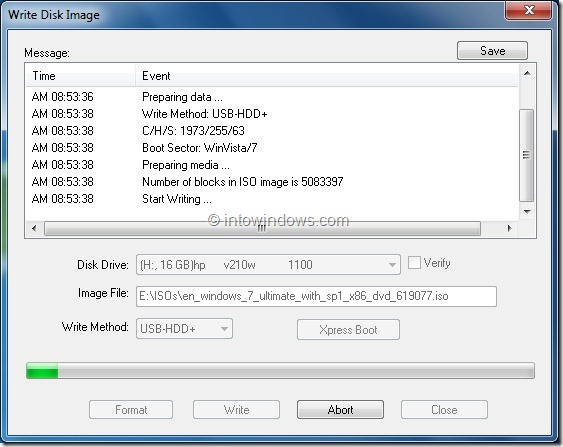
Step 4: Next, in the home screen of UltraISO, click on Bootable menu and then click Write Disk Image option to launch Write Disk Image dialog box.
 Step 5: In the Write Disk Image dialog, select the Disk Drive as your USB flash drive, select the write method as USB-HDD before hitting the Format button. It will then launch Format Removable Disk dialog, where you need to simply click Start button to begin formatting the flash drive. Please backup all data from the USB device before hitting the Format button.


 Step 6: Once the format in done, click Write button and then click Yes for the warning prompt to start the process. When the writing is finished, you will see Burn Successful message event list. Close UltraISO software and connect your USB to a machine to start installing Windows.



Any Video Converter Professional (WS)
 Any Video Converter is an All-in-One video converting tool with easy-to-use graphical interface, fast converting speed and excellent video quality. It allows you to effortlessly convert video files between every format! It can convert almost all video formats including DivX, XviD, MOV, rm, rmvb, MPEG, VOB, DVD, WMV, AVI to MPEG-4 movie format for iPod/PSP or other portable video device, MP4 player or smart phone. It also supports any user defined video file formats as the output. Any Video Converter makes it easy for anyone to enjoy the any format video with your iPod, PSP, mobile phone or MP4 player.

CCleaner Professional (WS)
From its name, you can guess that CCleaner is used to clean up your system. In fact, the first 'C' in CCleaner stands for the 'crap' that it can clean out. It has other uses too:
- Privacy: Delete passwords, Internet files, configuration files, and remove System Restore points from a shared PC.
- Speed: Speed up your computer by removing unneeded files. Speed up boot times by reducing the number of programs that start with Windows.
- Stability: Enable Windows to run more smoothly with a clean Registry.
- Space: Free up hard drive space by deleting unnecessary files. Detect and remove duplicate files that clutter up your PC.
Angry Birds All Games (WS)


Angry Birds Part 01
Angry Birds Part 02
Angry Birds Part 03

Avast Internet Security 2015 (WS)
Maximum virus and anti-spyware security solution for your Windows desktop. Provides also antispam and firewall protection from latest internet threats.

Internet Download Manager (Registered)

Download Here


