Monday, 13 April 2015
How To Use UltraISO Software To Create Bootable USB Flash Drive
Want to create a bootable Windows USB flash drive to install Windows without using DVD? Do you still use the good old UltraISO software to burn ISO files to CD or DVD? Then you use the UltraISO software to create bootable USB flash drive with a few clicks.
Here is how to use UltraISO software to create bootable USB drive:
Step 1: Install Ultra ISO by clicking on the link given below.
Step 2: The next step is to run UltraISO trial version with admin rights. Right-click on the UltraISO software shortcut on the desktop or Start menu entry, and select Run as administrator option. If you are prompted with Register Now screen, click Continue to Try.. button to use the trial version.


Step 4: Next, in the home screen of UltraISO, click on Bootable menu and then click Write Disk Image option to launch Write Disk Image dialog box.
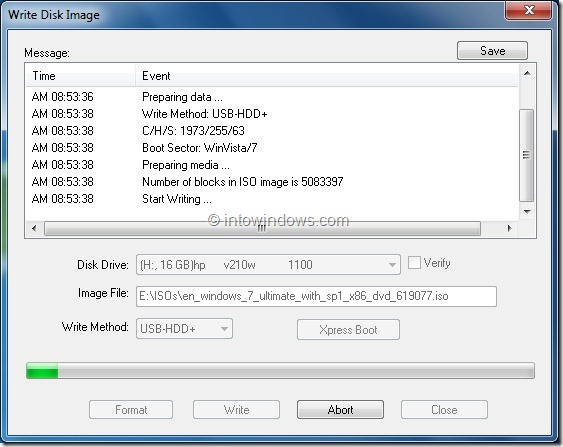
 Step 5: In the Write Disk Image dialog, select the Disk Drive as your USB flash drive, select the write method as USB-HDD before hitting the Format button. It will then launch Format Removable Disk dialog, where you need to simply click Start button to begin formatting the flash drive. Please backup all data from the USB device before hitting the Format button.


 Step 6: Once the format in done, click Write button and then click Yes for the warning prompt to start the process. When the writing is finished, you will see Burn Successful message event list. Close UltraISO software and connect your USB to a machine to start installing Windows.